1.
Set up a project
Set up a project with your source/target connections and select the tables you want to move.
Full Convert begins with an automatic migration. Tighten control at the project level and the table level. No more turning every move into a hand-crafted script.
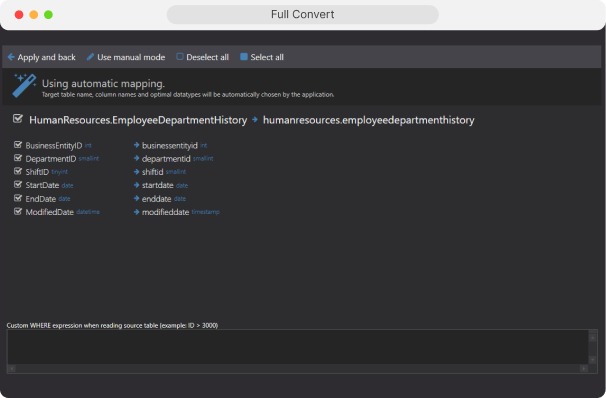

Customization in Full Convert works at two levels:

defaults and rules for the whole conversion.

exceptions for specific tables (and often specific columns) without changing the rest of the project.
The result: repeatable projects that behave the same every run, with just enough flexibility for real‑world edge cases.
A project is the saved definition of a conversion: source/target connections, selected tables, and the options that control how the conversion runs. The point is repeatability, you can run the same project again and get the same behavior.
Settings that apply to the project as a whole, what to move, how target tables are built, and the default mapping rules that govern every table.
What gets moved
select, include, or exclude tables for the project.
How tables are created/loaded
decide whether Full Convert creates target tables and how it loads into them.
General mapping rules
baseline schema/name/type mapping so most tables “just map” without manual work.
Run-time controls that shape how every conversion executes, and how it integrates with your release process.
Run behavior
global execution settings such as timeouts and database behaviors.
Automation hooks
run scripts or commands before and after conversion so the project fits into your deployment or operations workflow.
Ideal when you migrate multiple environments (dev/stage/prod) or rerun conversions during a cutover and want consistent rules every time.

Per-table settings exist for the handful of tables that don't fit your default rules. Instead of over‑complicating the whole project, you make precise overrides where they're needed.The key idea: manual table mapping overrides project defaults for that table. You keep project-level rules simple and only “go manual” where it matters.
Override target shape table by table, rename schemas, columns, or types, without touching the project defaults that work for everything else.
Rename target objects
adjust table names, schema names, or column names for specific tables.
Column-level changes
tune target data types, precision/scale, defaults, and inclusion.
Override load behavior and filter rules per table for the cases that don't fit your project-wide defaults.
Table-specific create/load behavior
handle special cases such as existing tables or staging-only loads.
Skip constraints or indexes
for a table when you're doing phased migrations and want to add constraints later.
Filter rows per table
apply a table-level WHERE filter for partial data moves or staged rollouts.
In practice, this is the fastest way to handle edge cases: fix the one table that's weird, leave the rest automatic.
Set up a project with your source/target connections and select the tables you want to move.
Run once with automatic mapping to see which tables are clean and which ones need attention.
Switch problem tables to manual mapping and adjust only those tables and columns.
Re-run the project until the output is correct, then reuse that same project for the final run, and for future refreshes.
Use project options to define consistent, repeatable, broad rules that apply across your migration. Think of them as the “golden path” for how conversions should work.
Use per-table mapping when defaults aren't enough. You get precise, local control without giving up the simplicity and safety of a project‑driven migration.
Full Convert is used by thousands of
organizations in 100+ countries.