PROJECT OPTIONS
Conversion
These options control how tables are created in the target and how the data gets there.
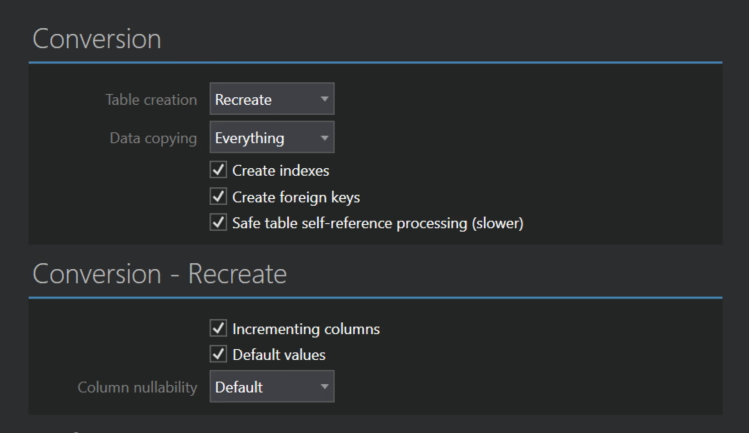
Table creation
- Recreate is the default. Tables are created from scratch on each run. If a table already exists in the target, it is dropped first, then created.
- Expect existing preserves the tables you already have in the target. Full Convert doesn't drop or create anything, it only copies the data into the existing tables. Use it when you have prepared the target tables yourself.
Data copying
- Everything is the default. All records are copied from the source. If the target table already has records, they are removed first.
- Added records copies only the records that are new since the last run. Full Convert looks up the highest key value in the target table and copies the source records with a higher key. Existing records are left alone and nothing is duplicated, so this is the mode for a recurring copy of a growing table. It needs a primary key or a comparison key on the table, and it switches Table creation to Expect existing, since the target table has to be there.
- Append records copies all records from the source without touching the existing target data. It's your responsibility to make sure the source contains only fresh data on each run, otherwise you end up with duplicates. This mode also switches Table creation to Expect existing.
- None removes all records from the target tables and copies nothing. Handy when you want empty tables with the right structure.
Indexes and foreign keys
- Create indexes and Create foreign keys are on by default and recreate the source indexes and relationships in the target. They only apply when tables are recreated, so they switch off automatically for Expect existing, Added records and Append records.
- Safe table self-reference processing (slower) handles tables that reference themselves, such as an employee table with a manager column pointing to another employee. The self-referencing columns are filled in after all the records are copied, so no record points to a parent that isn't there yet. Leave it on unless you know your data doesn't need it and you want the extra speed.
Recreate
When tables are created from scratch, these options decide which column properties come along.
- Incrementing columns preserves the auto-incrementing property of columns. Nowadays this is typically an IDENTITY attribute, but databases have different ways of expressing it, and Full Convert translates between them.
- Default values preserves column default value definitions, translated to the target database dialect where possible.
- Column nullability lets you force NULL or NOT NULL on all columns in all tables at once. Leave it at Default to keep the source definitions.
