PROJECT OPTIONS
Logging
Full Convert can write several log files on each run. Pick the ones you need and where they go.
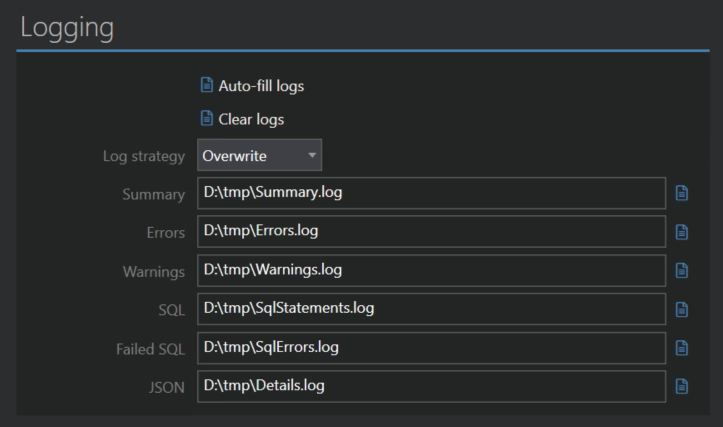
Auto-fill logs
The quickest way to set things up. Click it, select a folder, and all six log file paths are filled in for you: Summary.log, Errors.log, Warnings.log, SqlStatements.log, SqlErrors.log and Details.log. Clear logs empties all six paths again, which switches logging off.
Log strategy
Users have different expectations of how log files should behave from run to run, so Full Convert supports a variety of approaches:
- No logging suspends logging even when file paths are filled in.
- Overwrite is the default. On each run, the log files are written anew, replacing the previous ones.
- Timestamped folder creates a new subfolder with a timestamp in its name on each run, and writes the log files into it.
- Timestamped files creates new files with a timestamp in their names on each run, all in the same folder.
- Append never truncates the files. New runs are added to the end of the existing ones.
Summary
A high-level overview of the run. Tables processed, records copied, duration, and whether there were problems.
Errors
A simple list of all errors, grouped by table.
Warnings
A simple list of all warnings, grouped by table.
SQL
A complete list of all SQL statements sent to the target database. When the target is not a relational database, this log is empty. When bulk loading is used, there are no INSERT statements either, because bulk loading bypasses SQL to achieve maximal performance. If you absolutely need to see those statements, turn on Insert 1 record at a time in Troubleshooting. That is very slow, but very good for inspecting exactly what is sent.
Failed SQL
Only the SQL statements that made the target database report an error. Whenever you get an error that isn't related to the data itself, this is the place to look.
JSON
The richest log. As JSON is structured and hierarchical, it holds everything about the run in one file: the high-level overview, performance details for each table, and all the errors. Good for processing the results with your own tools.