PROJECT OPTIONS
Performance
Full Convert is fast out of the box. These options help when the databases are very large, very slow, or have thousands of tables.
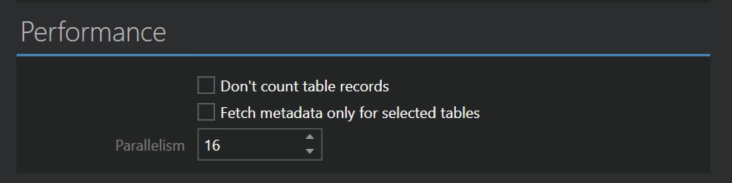
- Don't count table records skips counting the records in each table before the copy starts. Counting is what the measuring tables stage does, and on slow databases it can take a while. The copy starts sooner, but you lose the very useful progress bars for individual tables.
- Fetch metadata only for selected tables reads just the list of tables when the project opens, and the full table structure only for the tables you select. Use it when you have a slow source database with a lot of tables but need to copy only a few. With this option on, tables start deselected.
The Parallelism option is only available in the Ultimate plan.
- Parallelism is the number of tables processed at the same time, from 1 to 64. The higher the number, the faster all operations are, as long as your databases and your computer keep up. If the databases are underpowered and you want to reduce the load on them, lower the number. The wizard picks a sensible value based on your processor count.
