PROJECT WIZARD
Target database
The target database is the database that will receive all the tables and data from the source. By default, Full Convert recreates all the tables, copies all the data, then creates indexes and foreign keys. This doesn't apply to all database types, of course, as some don't have such concepts.
Selecting the database type, filling in the connection information and using favorites work exactly as on the Source database step.
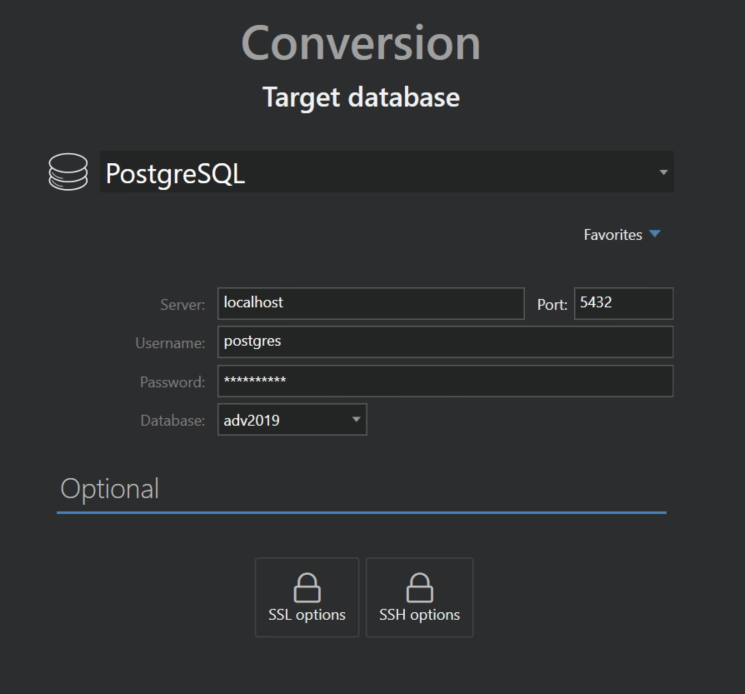
Server databases
Make sure your database server is installed and running before attempting to connect to it. The database itself doesn't have to exist. If it doesn't, Full Convert asks whether you would like it created now and creates it for you.
File databases
For file databases such as SQLite, Access or Firebird, specify where the new database file should be created. The file extension is added automatically if you leave it out. If you leave the location empty, the file is created in a Spectral Core folder on your desktop.
Some file types are written as a whole folder of files. Full Convert warns you before it uses a folder whose contents would be deleted during the conversion, so please choose an empty folder.
Source and target are the same
If you connect to the same database as source and target, Full Convert warns you and leaves all tables deselected. Give the target tables different names in the table mapping before selecting them, or you might lose your data.
Replication projects
A replication project needs a target that can be updated record by record, so file formats such as CSV, Excel and JSON are not offered as replication targets.
Click Next to connect to the target database and continue to the review step. Detailed information on connecting to each database is in the Database Connections section.
