PROJECT OPTIONS
Mapping
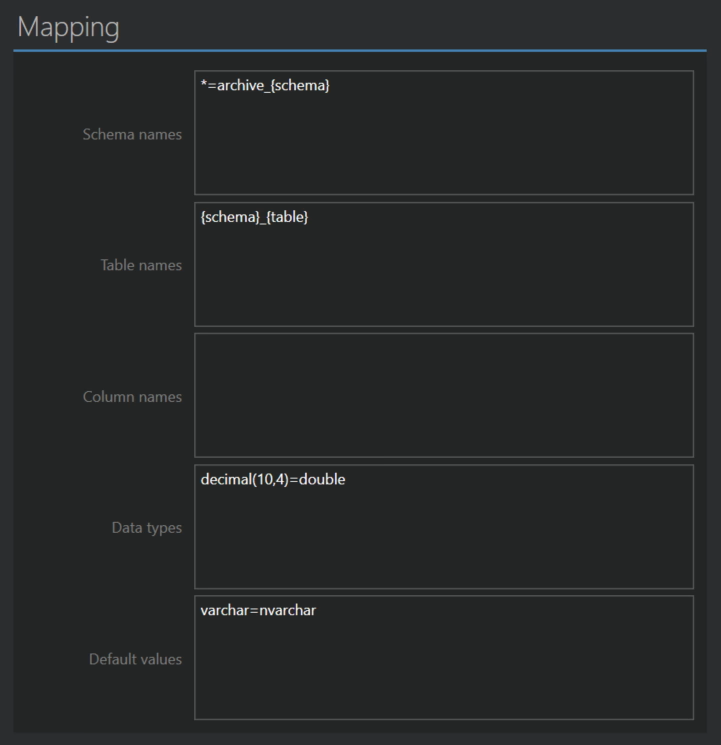
Mapping rules change how source names and data types are translated to the target, for the whole project at once. Each rule is one line in the form source=target. Rules are applied in the order you list them, and the first rule that matches wins. Anything without a matching rule is mapped the usual way.
To change a single table or column, use the table mapping screen instead. These rules are for patterns that repeat across the project.
In schema and table rules you can use placeholders, which are replaced for each table:
{schema}is the source schema of the table{table}is the source table name{db}is the source database name
Schema names
Moves tables to a different schema in the target. Rules are case-insensitive, so one rule matches Sales, sales and SALES. The source side can be a schema name or * for any schema.
HumanResources=hrputsHumanResources.Employeeintohr.Employee.*=hrputs every table into thehrschema.*={schema}_archivekeeps the schema name and adds a suffix, soSales.OrdersbecomesSales_archive.Orders.*={db}puts every table into a schema named after the source database.
Schema mapping can be overridden when running from the console application with the -OSM switch.
Table names
Renames tables. A rule matches the whole name, or a part of it when you use *. Matching is case-insensitive, and every occurrence of the matched text in the name is replaced.
Customers=Clientsrenames theCustomerstable toClients.tbl*=t_renames tables starting withtbl, sotblOrdersbecomest_Orders.*_old=_archiverenames tables ending in_old, soOrders_oldbecomesOrders_archive.*temp*=tmpreplacestempanywhere in the name.*={schema}_{table}puts the schema into the table name, soSales.OrdersbecomesSales_Orders. Useful when the target has no schemas.*=sc_limit_length(30)cuts every name to 30 characters, for targets with short name limits.
Column names
Renames columns in all tables, with the same rules as table names but without placeholders. *_ts=_timestamp renames created_ts to created_timestamp in every table that has it.
Data types
Overrides how source data types are translated. To learn the exact source type name to use, open the manual mapping of a table and look at the source column types.
varchar=charmatchesvarcharof any size and keeps the size, sovarchar(10)becomeschar(10)andvarchar(100)becomeschar(100).varchar(10)=charmatches onlyvarchar(10). Other sizes are not affected.varchar=char(1)forces the size, so everyvarcharbecomeschar(1).decimal(10,4)=doublematches only decimals with precision 10 and scale 4.decimal(1..10,0..4)=doublematches a range of precisions and scales.
Default values
Replaces column default values that don't translate on their own, typically functions. The source side must be the default exactly as your source database reports it, and matching is case-insensitive. For example, getdate()=now() turns a SQL Server default into the PostgreSQL equivalent, provided the source reports the default as getdate().
This only applies when Default values is on in the Conversion options.
